Quick integration guide for the Verifacti APIs
This guide explains step by step how to integrate your software with the Verifactu API, the TicketBAI API or the SII API, from the free account to production. The account, the NIFs, the representation form and the move to production are common to all of them; in the steps that change by API (sending, status and corrections) choose yours and the guide shows only what applies to you.
1. Create a free account
Create a free account in 30 seconds:
- Click the sign up free button.
- Enter your email and password.
- Verify your email by clicking the link in the email we send you.
Once inside you will see the companies panel, with a test NIF already set up to send invoices to the AEAT test environment with Verifactu, from our interface or through the API. The whole basic integration can be done with the free account.
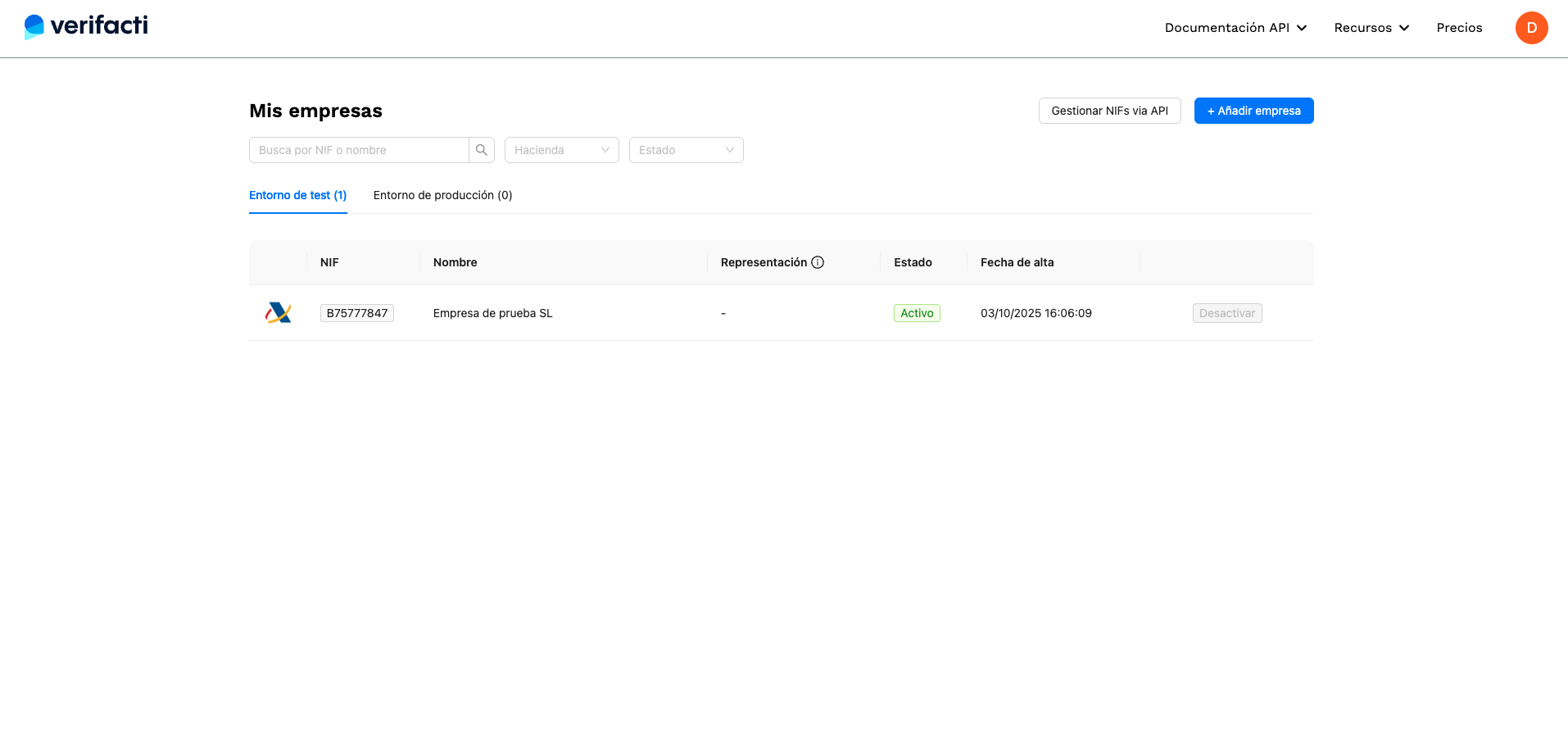
The test NIF is a Verifactu one. To test TicketBAI or the SII you need a test NIF for that treasury: ask soporte@verifacti.com, stating which one (Álava, Bizkaia, Gipuzkoa or SII), and we will activate it.
See what the free account includes and whether I can test TicketBAI with the free account.
2. Send a test invoice
When you open the test NIF you will see an integrated terminal to send invoices to the AEAT. It offers a simple interface to load all kinds of invoice examples and send them with one click to the AEAT test environment.
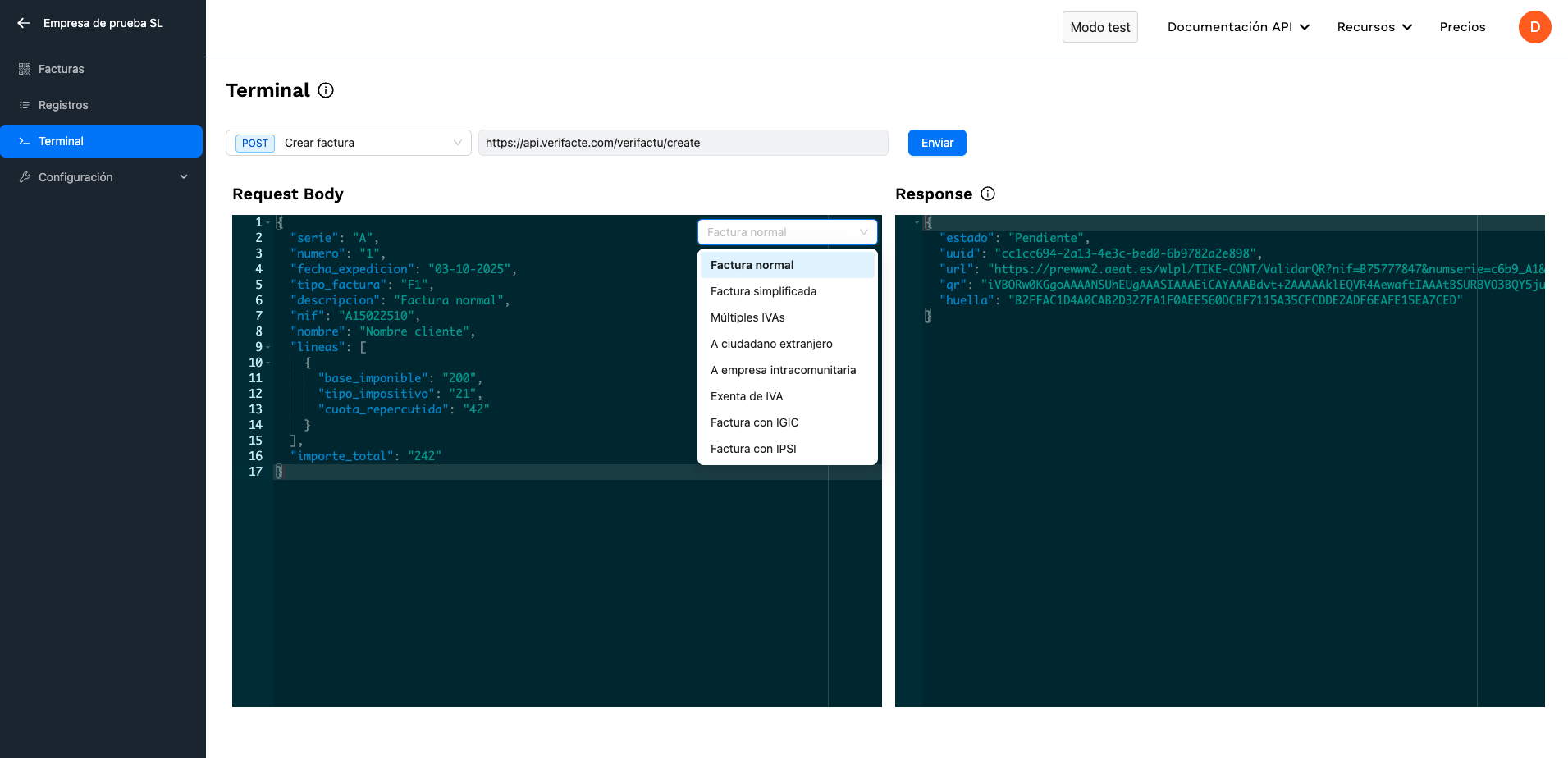
The response contains the QR code (as a base 64 string) of the generated invoicing record, for you to paste on your invoice. The QR holds the AEAT URL that shows whether the invoice is already registered in its systems.
API - Create invoices
To generate an invoicing record and send it to the AEAT, call POST /verifactu/create with the API key of the test NIF (B75777847, the same in every account), found in its API key tab. More in the documentation.
POST /verifactu/create
{
  "serie": "Ejemplos",
  "numero": "1",
  "fecha_expedicion": "19-11-2026",
  "tipo_factura": "F1",
  "descripcion": "Factura normal",
  "nif": "A15022510",
  "nombre": "Nombre destinatario",
  "lineas": [
    {
      "base_imponible": "200",
      "tipo_impositivo": "21",
      "cuota_repercutida": "42"
    }
  ],
  "importe_total": "242"
}
More cases in the Verifactu invoice examples.
Call POST /ticketbai/create with the NIF's API key. The same endpoint and the same JSON work for Álava, Bizkaia and Gipuzkoa: the destination is the NIF's treasury. The response returns straight away the uuid, the TicketBAI code (tbai), the verification url and the qr; the code and the QR are printed on the invoice. Verifacti generates the TicketBAI file, signs it and sends it to the foral treasury.
Your software does not have to register as guarantor software: the guarantor software is Verifacti, registered with all three foral treasuries.
POST /ticketbai/create
{
  "serie": "Ejemplos",
  "numero": "1",
  "fecha_expedicion": "19-11-2026",
  "descripcion": "Factura completa",
  "nif": "A15022510",
  "nombre": "Nombre destinatario",
  "cp": "48001",
  "direccion": "Calle Ejemplo 1, Bilbao",
  "lineas": [
    {
      "descripcion": "Servicio de consultoría",
      "cantidad": "2",
      "importe_unitario": "100.00",
      "importe_total": "242.00"
    }
  ],
  "desglose_iva": [
    {
      "base_imponible": "200.00",
      "tipo_impositivo": "21",
      "cuota_impuesto": "42.00"
    }
  ],
  "importe_total": "242.00"
}
More cases in the TicketBAI invoice examples.
Call POST /sii/create with the NIF's API key. The SII API sends the issued-invoices record book, and only that one. Verifacti validates the invoice and answers with its uuid and the status Pendiente (pending): the invoice is queued and goes to the AEAT in the NIF's next submission. With many invoices, you can also send them in a batch with POST /sii/create_bulk.
POST /sii/create
{
  "ejercicio": "2026",
  "periodo": "11",
  "serie": "A",
  "numero": "1",
  "fecha_expedicion": "19-11-2026",
  "tipo_factura": "F1",
  "clave_regimen": [
    "01"
  ],
  "descripcion": "Factura normal",
  "nombre": "Nombre cliente",
  "nif": "A15022510",
  "desglose": {
    "no_exenta": {
      "tipo_no_exenta": "S1",
      "detalle_iva": [
        {
          "tipo_impositivo": "21",
          "base_imponible": "200",
          "cuota_repercutida": "42"
        }
      ]
    }
  },
  "importe_total": "242"
}
More cases, with regime keys, summary entries or cash accounting, in the SII examples.
3. Confirm the status
In every API, the recommended way to get the result is webhooks, which notify you of each status change. You can also check it with each API's status endpoint, or see it in the dashboard's records table.
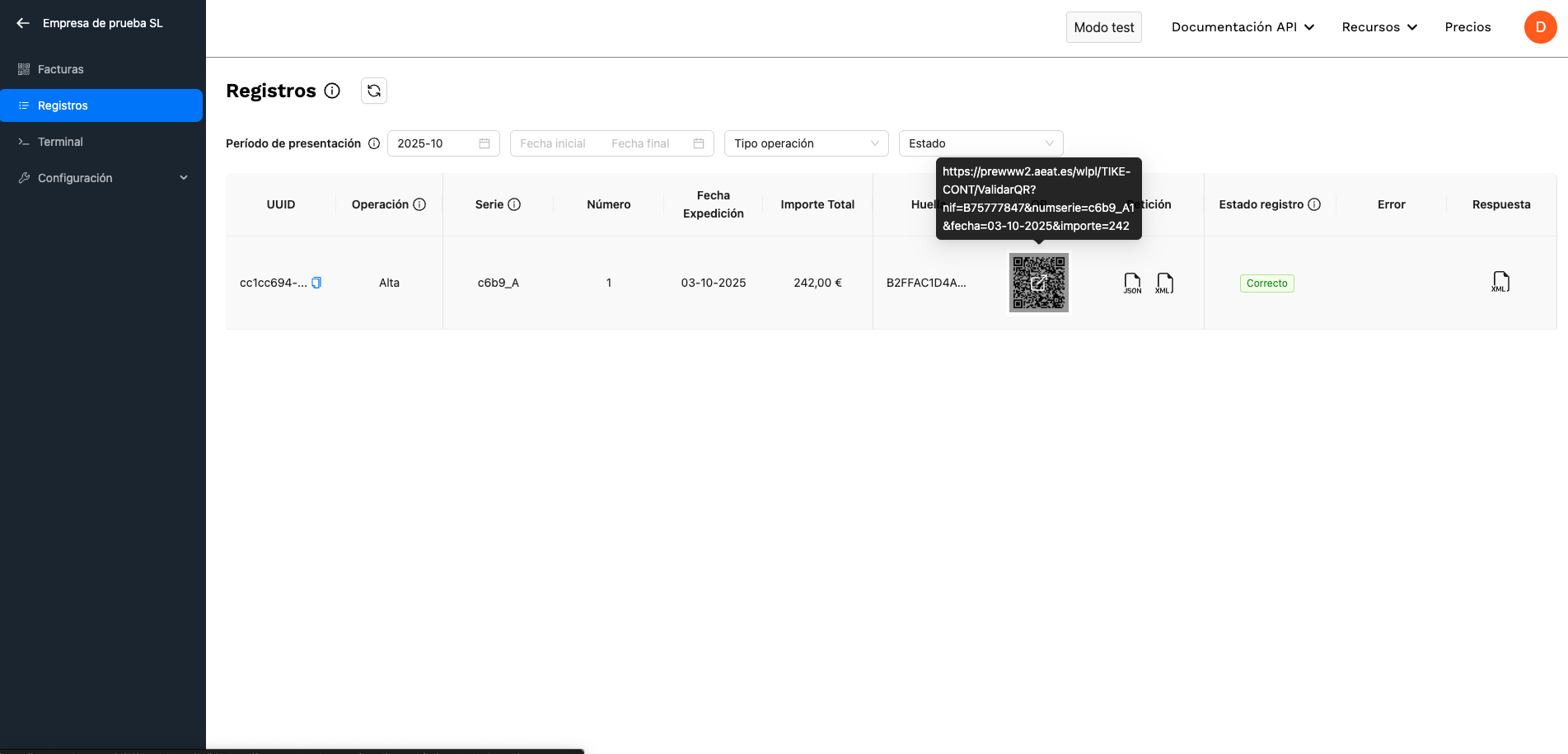
When you send the invoice, the API returns the status Pendiente (pending): the record has been generated and queued to be sent to the AEAT, usually within one or two minutes. Because of how Verifactu works, records are not sent immediately. Check the status with GET /verifactu/status and the uuid returned on creation, and list the submitted invoices with POST /verifactu/list. See the Verifactu API documentation.
Check the status with GET /ticketbai/status and the uuid, or POST /ticketbai/status by series, number and date. See the TicketBAI API documentation.
When the AEAT answers, the record status is updated; check it with GET /sii/status. Possible statuses include Correcto (accepted), Aceptado con errores (accepted with errors) and Incorrecto (rejected); the details are in codigo_error and mensaje_error. See the SII API documentation.
4. Correct or cancel invoices
If the invoice does not require a corrective invoice, fix it with PUT /verifactu/modify and the corrected record. If it does, create it with POST /verifactu/create and the matching tipo_factura (R1 to R5). To cancel, POST /verifactu/cancel with series, number and issue date; a cancelled invoice cannot be created again with the same data. Cases in the Verifactu corrective invoices.
POST /verifactu/cancel
{
  "serie": "A",
  "numero": "1",
  "fecha_expedicion": "25-02-2025"
}
PUT /verifactu/modify
{
  "rechazo_previo": "N",
  "serie": "Ejemplos",
  "numero": "1",
  "fecha_expedicion": "19-11-2026",
  "tipo_factura": "F1",
  "nif": "A15022510",
  "nombre": "Nombre destinatario",
  "descripcion": "Descripcion modificada",
  "lineas": [
    {
      "base_imponible": "200",
      "tipo_impositivo": "21",
      "cuota_repercutida": "42"
    }
  ],
  "importe_total": "242"
}
To cancel, POST /ticketbai/cancel with series, number and issue date. To correct in Álava and Gipuzkoa, PUT /ticketbai/modify with the same body as when creating plus the accion field: SUBSANAR (fix a rejected invoice) or MODIFICAR. In Bizkaia there is no modification or correction through the API.
POST /ticketbai/cancel
{
  "serie": "A",
  "numero": "1",
  "fecha_expedicion": "19-11-2026"
}
PUT /ticketbai/modify (Álava and Gipuzkoa)
{
  "accion": "SUBSANAR",
  "serie": "Ejemplos",
  "numero": "1",
  "fecha_expedicion": "19-11-2026",
  "descripcion": "Factura completa (datos corregidos)",
  "nif": "A15022510",
  "nombre": "Nombre destinatario",
  "cp": "48001",
  "direccion": "Calle Ejemplo 1, Bilbao",
  "lineas": [
    {
      "descripcion": "Servicio de consultoría",
      "cantidad": "2",
      "importe_unitario": "100.00",
      "importe_total": "242.00"
    }
  ],
  "desglose_iva": [
    {
      "base_imponible": "200.00",
      "tipo_impositivo": "21",
      "cuota_impuesto": "42.00"
    }
  ],
  "importe_total": "242.00"
}
If the AEAT accepts an invoice with errors, correct it with PUT /sii/modify and the full body of the corrected invoice. If it rejects it (Incorrecto), it is not recorded: fix the data and send it again with /sii/create. To remove an invoice from the book, POST /sii/cancel.
PUT /sii/modify
{
  "ejercicio": "2026",
  "periodo": "11",
  "serie": "A",
  "numero": "1",
  "fecha_expedicion": "19-11-2026",
  "tipo_factura": "F1",
  "clave_regimen": [
    "01"
  ],
  "descripcion": "Factura normal (descripción corregida)",
  "nombre": "Nombre cliente",
  "nif": "A15022510",
  "desglose": {
    "no_exenta": {
      "tipo_no_exenta": "S1",
      "detalle_iva": [
        {
          "tipo_impositivo": "21",
          "base_imponible": "200",
          "cuota_repercutida": "42"
        }
      ]
    }
  },
  "importe_total": "242"
}
POST /sii/cancel
{
  "ejercicio": "2026",
  "periodo": "11",
  "serie": "A",
  "numero": "1",
  "fecha_expedicion": "19-11-2026"
}
5. Activate the paid subscription
To prepare the move to production, activate your paid subscription:
- Go to the pricing page.
- Click the "Buy first NIF" button. You will be redirected to the payment page.
- Check the "I'm purchasing as a business" box to enter your tax ID, which will appear on the invoices.
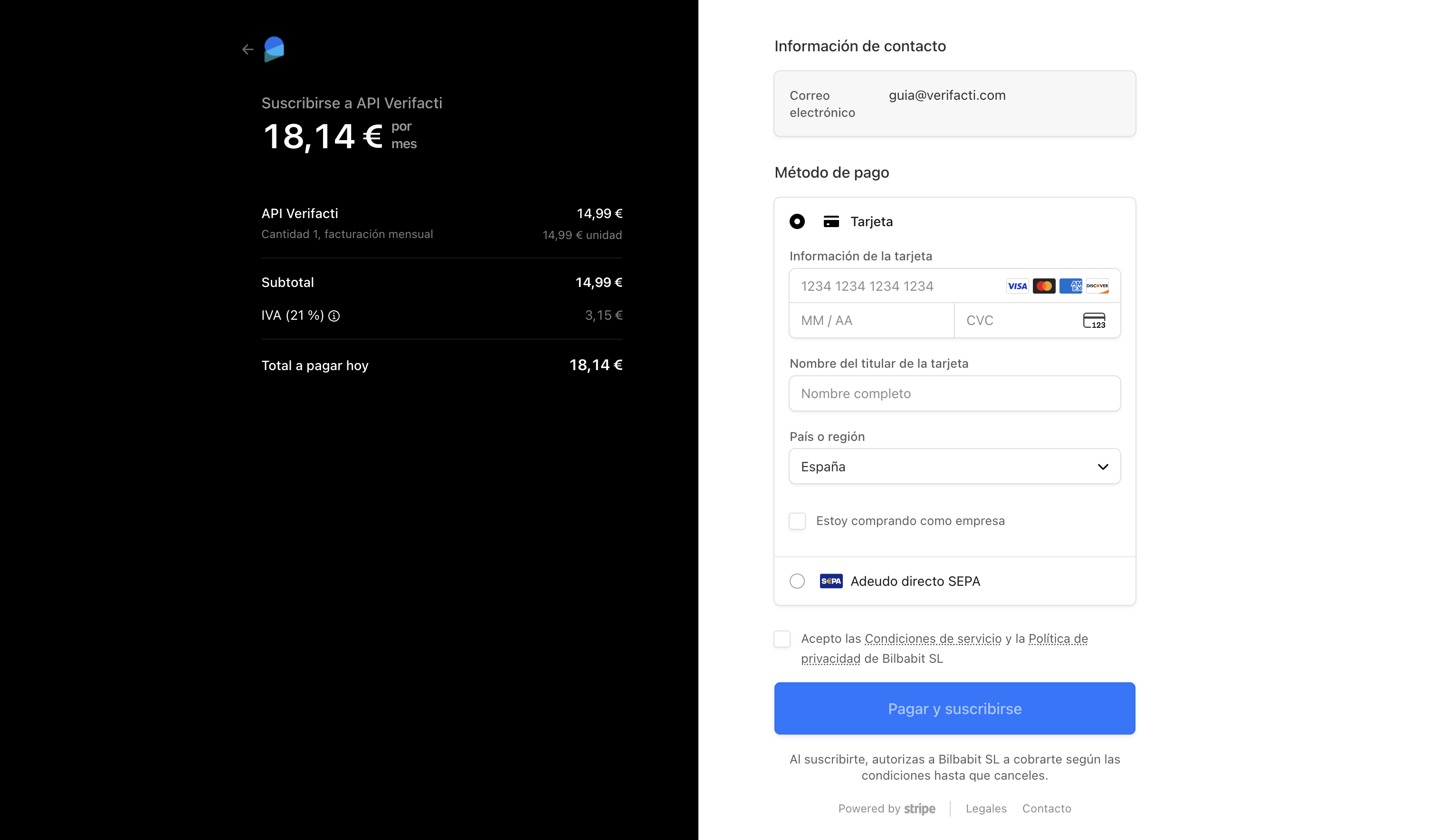
The SII is custom-priced and not on the pricing page: ask for a quote via contact. See when I start paying.
6. Register your NIFs
With an active subscription you can create as many test issuing NIFs as you want, at no additional cost. Go to the companies panel and click "+ Add company".
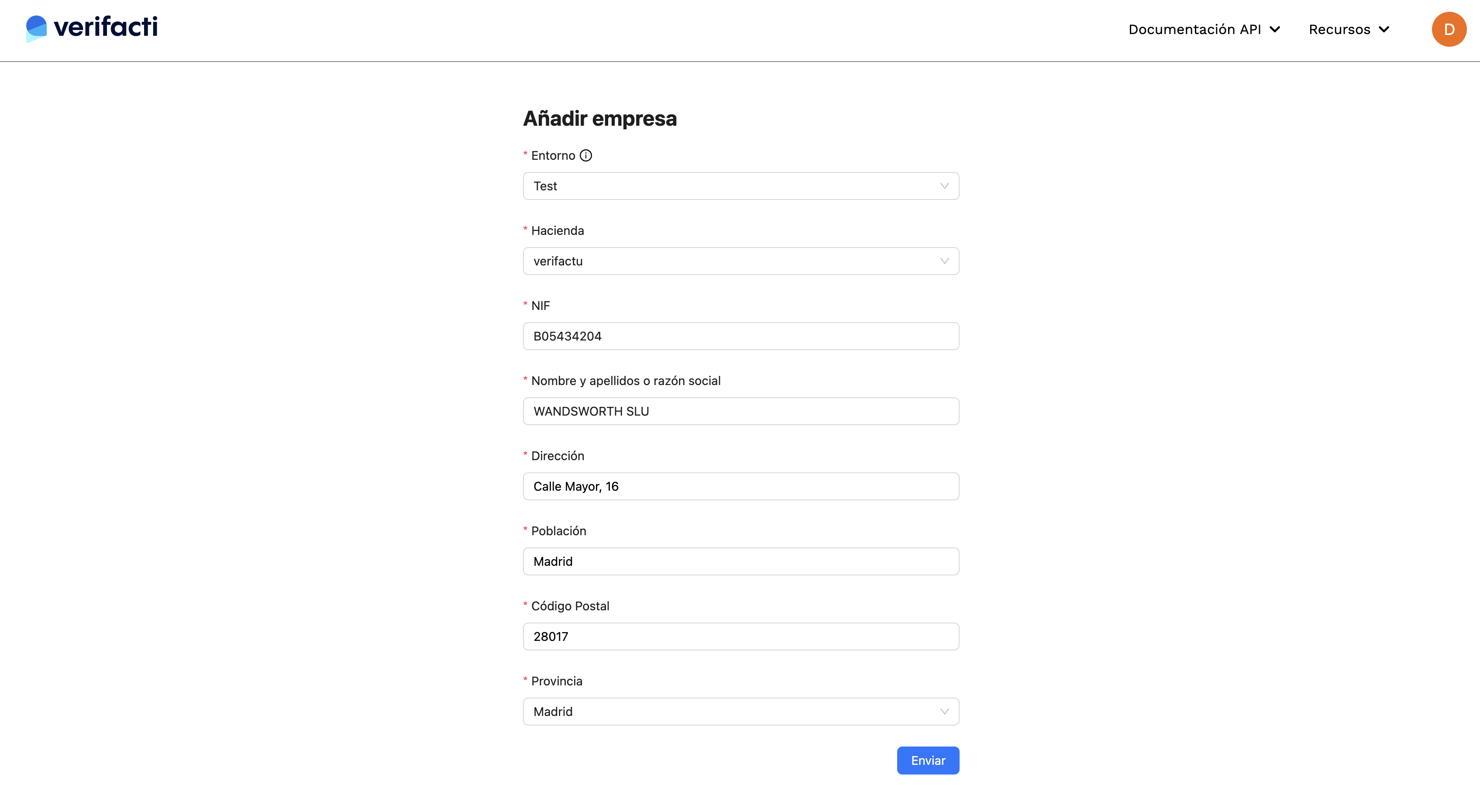
Choose the environment and the treasury carefully. Test NIFs send to the test environment and production NIFs to the real one; only the latter count for the monthly bill. The treasury sets the destination: verifactu, alava, vizcaya, guipuzcoa or sii. Each combination of NIF, environment and treasury is a separate NIF with its own API key, and the same NIF can be in several treasuries at once.
API - Add invoice-issuing NIFs
To send invoices for hundreds or thousands of companies or self-employed people, create them with POST /nifs and your account API key, found in the account settings (API key tab). How to add, modify or deactivate NIFs, in the NIF management API documentation.
Remember that each NIF has its own API key to send its invoices. See how API keys, environments and NIF management work.
7. Manage the representation form
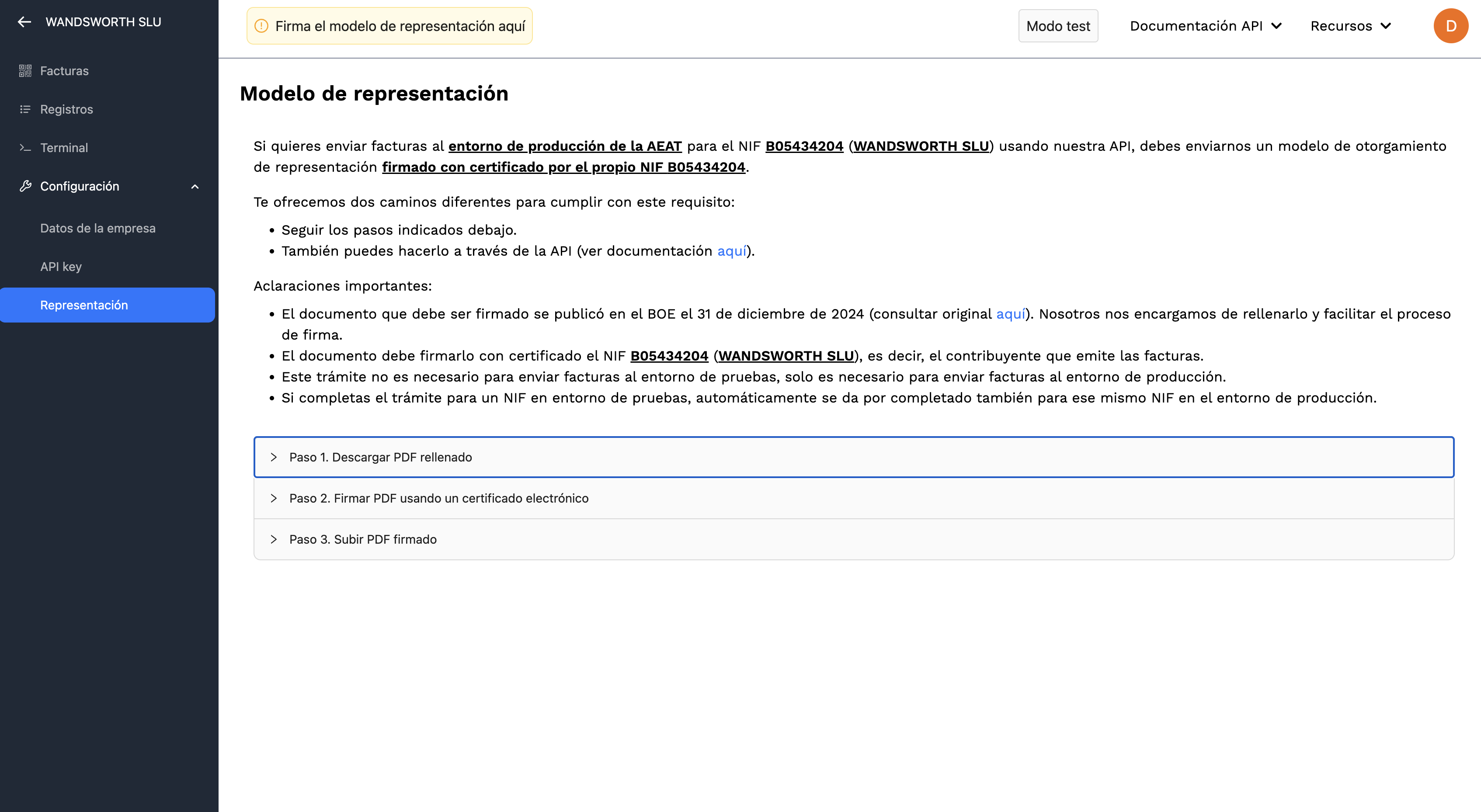
For Verifacti to send invoices on a company's behalf, a document authorising us must be signed. It is the same for the AEAT (Verifactu and SII) and for the three foral treasuries. Test NIFs do not need it, but you can fill it in from the test NIF and it will be valid when you create the NIF in production.
Download the pre-filled form from the NIF page, which explains how to fill it in, sign it and send it. It can also be signed online, with video identity verification and no digital certificate (€2.90 + VAT per signature, individuals only): online signing.
API - Representation form
Forms can be filled in and sent through the API with your account API key (account settings, API key tab). Details in the documentation.
See how certificate and representation-form management works.
8. Move to production
With the integration done and the representation form signed, create the same NIF in the production environment, with its treasury, and swap the test API key for the production one. Production NIFs are the ones that count for the subscription; the same NIF registered with two treasuries counts as two NIFs.
API - Create NIFs in production
To move your test NIFs to production through the API, chain the list NIFs, get each one and create-in-production endpoints, with your account API key. Details in the NIF management API documentation.
- TicketBAI in Bizkaia: the API sends each issued invoice to the Batuz LROE (form 140 or 240). More in TicketBAI in Bizkaia.
- SII: keep the deadline in mind, four calendar days from the issue of each invoice, excluding Saturdays, Sundays and national holidays (eight for invoices issued by the recipient or a third party). Details in SII deadlines.
9. Publish the statement of conformity (Verifactu only)
Verifactu has no external certification or AEAT verification: each invoicing software must include a document that self-certifies it meets the requirements. TicketBAI and the SII do not ask for it.
With an API like ours, both your software and Verifacti must have their statement of conformity (declaración responsable). You can download Verifacti's (PDF) and use our template to prepare yours. See how to publish the statement of conformity.
Keep integrating
You now have the whole flow. To keep going, read your API documentation and copy the invoice examples.
Frequently asked questions
More frequently asked questionsHow long does the integration take?
Are the endpoint URLs different for test and production environments?
- In the test environment, the company API key starts with vf_test_
- In the production environment, the company API key starts with vf_prod_
Do I need a separate integration for TicketBAI or is it the same integration for both TicketBAI and Verifactu?
- Consistency: the endpoints, fields, and error messages we present to our users are practically the same as those in the tax authority APIs.
- Easier tax consultations: this similarity eliminates interpretations or biases stemming from an intermediary API, which streamlines communication with advisors and with the tax authorities themselves.
Can I test TicketBAI with the free account?
When do I start paying? Do I have to pay now if Verifactu is not mandatory yet?
How do I create my responsible declaration (declaración responsable)?
- We provide an editable Word document.
- We include informational notes for the more complex sections.
- We add a section to explain the role of the Verifacti API.
- Section titles are in bold and larger font.
- Replace the example responses with your own data.
- Delete the informational notes when completing the document.
Start with the free account
The first step of the guide: test environment and test NIF included.